From Lead to Loyal Client: Automating the high-friction onboarding process.
The Problem: The “Black Hole” of Manual Onboarding
In many service-based businesses, a “Lead” is often just an email sitting in an inbox. Converting that lead into a client requires multiple manual steps: checking availability, scheduling trials, conducting assessments, and manual data entry. If a step is missed, the lead is lost.
The Solution: An Automated Status-Driven Engine
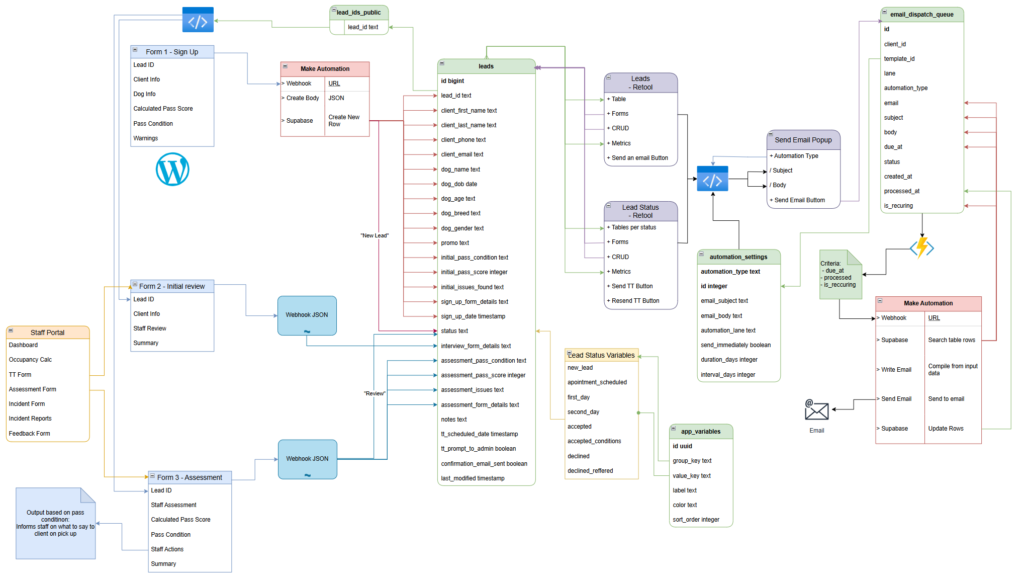
I built a linear, automated pipeline within the Management Hub that moves a client through five distinct stages. The system uses Supabase as the source of truth, Retool as an Admin dashboard / CRM, and WordPress as the staff / Client interface.
The Pipeline Stages:
New Lead: Entry via a WordPress form or manual entry.
Trial Day: Automated triggers move the lead here once a trial is booked.
Review/Assessment: Staff use a tablet-optimized Retool form to record “Baseline Behavior” during the trial.
Accepted/Waitlist: Based on the assessment, the status is updated, triggering a final welcome sequence.
The Staff Experience (WordPress + WS Forms)
Instead of a complex database login, staff use a streamlined Staff Portal built on WordPress.
- The Trial Assessment Form: When a new lead arrives for their trial, staff open a custom WS Form on a tablet.
- Real-time API Integration: Using the WS Forms Supabase integration, the data doesn’t just send an email—it maps directly to the specific Lead record in the database.
- The “Baseline” Logic: Staff record behavioral notes and safety checks. Once submitted, the form triggers a status change in the database.
The Admin Experience (Retool)
While staff see a simple form, the Admins see the “Control Room” in Retool.
- Kanban Management: Admins view a Retool board where leads move automatically from “Trial Booked” to “Review Required” based on the staff’s WordPress submissions.
- The Decision Hub: From Retool, the Admin can see the staff notes, the dog’s age (calculated automatically via a SQL function), and click a single button to “Approve.”
- Email Automation: Admins have the ability to send a variety of configurable emails directly to leads. These emails auto populate with the lead data to reduce any manual entry requirements.
Technical Deep Dive: The SQL “Dog Age” Function
To keep the UI clean on both WordPress and Retool, I didn’t want staff manually calculating ages. I wrote a PostgreSQL function in Supabase that calculates the age in real-time based on the date_of_birth column.
This ensures that whether a staff member looks at the dog’s profile on the WordPress portal or an Admin looks at the dashboard in Retool, the age is always accurate to the day.
The Automation: Closing the Loop
The moment the Admin clicks “Approve” in Retool:
- Supabase updates the status to
Active. - A Webhook is sent to Make.com.
- Make generates a personalized “Welcome” email, syncs the contact to the marketing list, and notifies the team via Email.
Why This Architecture Wins
By separating the Staff Input (WordPress) from the Admin Control (Retool), I achieved:
- Security: Staff only see what they need to see for the task at hand.
- Data Integrity: No manual data entry or “copy-pasting” from emails to spreadsheets.
- Scalability: The business can process dozens of leads simultaneously with a clear audit trail of who performed the assessment and when.